The AI worker's own computer
The idea
Crewshal can give an AI worker its own computer: a private Linux machine that keeps its tools and its work like a laptop. When an admin issues it from the worker's page, it stays until someone revokes it or the worker leaves the organization. A second person approves what is installed on it and which hosts it may reach: an owner, or an admin who did not issue it. The worker's own browser can open only those hosts, their subdomains and apps that run on the computer itself. The feature is built and switched off in production.
- The problem
- A worker without its own machine cannot keep sign-ins, tools or state.
- Why it matters
- The worker keeps its environment and accounts, and a revoke fences it at once.
- Where it stands
- Built, off in production as of Shown on a real guest computer on a local backend in owned runs on November 14 and 15, 2026; production keeps it switched off.
Crewshal team · · 5 min read
Recorded run · Owned QA, a real guest on a local backend · November 14–15, 2026
What happens on the worker's own computer?
A real guest computer is issued, approved, set up, checkpointed, restored and revoked. A second computer's browser reaches only approved sites. In production the feature is switched off.
The first computer, November 14, 2026
Approval
Request from Admin
Waiting
Onboarding job
- Provision
- Allowed hosts
- Install tools
- Health check
- Checkpoint
Checkpoint
none yetThe worker's computer
RequestedLinux engineer, version 1
- gh
- acli
- node
- codex
- playwright
- claude-code
- agent-browser
Network proxy9 hosts requested
- github.com
- nodejs.org
- registry.npmjs.org
- 6 more
AdminAn admin issues the worker a computer
An admin asks for a computer for one AI worker. The request names a built-in install manifest of pinned tools. The manifest names the 9 hosts that the computer may reach, such as github.com and nodejs.org. This computer is kept until someone revokes it. Nothing is set up yet.
InputThe request
- Install manifest
- Linux engineer, version 1: 7 tools with pinned versions, plus system packages
- Allowed hosts
- 9, such as github.com, nodejs.org, registry.npmjs.org
- Kept
- Until revoked
CheckRecorded gates
- An admin created it through the APIPassed
AdminAn admin issues the worker a computer
An admin asks for a computer for one AI worker. The request names a built-in install manifest of pinned tools. The manifest names the 9 hosts that the computer may reach, such as github.com and nodejs.org. This computer is kept until someone revokes it. Nothing is set up yet.
The record for step 1
InputThe request
- Install manifest
- Linux engineer, version 1: 7 tools with pinned versions, plus system packages
- Allowed hosts
- 9, such as github.com, nodejs.org, registry.npmjs.org
- Kept
- Until revoked
CheckRecorded gates
- An admin created it through the APIPassed
OwnerThe owner approves the tools and the hosts
The request is high risk and goes to the owners. An owner, or an admin who did not issue it, may approve it. Here the owner approves it on the normal decision path. The approval covers this computer's install manifest and its 9 allowed hosts.
The record for step 2
DecisionThe approval
- Risk
- High
- Who may approve
- An owner or another admin, not the issuer
- Decided by
- The owner
CheckRecorded gates
- The owner approved it on the decision pathPassed
CrewshalOne job builds the computer
One background job sets the computer up, in order: it provisions the guest (1 s), applies the allowed hosts (1 s), installs the tools (1 min 31 s) and runs a health check (the doctor), which passes 23 of 23 checks (5 s).
The record for step 3
OutputPhases
- Provision
- 1 s
- Allowed hosts
- 1 s
- Install tools
- 1 min 31 s
- Health check
- 5 s
OutputTools on the computer
gh 2.104.0acli 1.3.40-stablenode 24.22.3codex 0.169.0playwright 1.65.1claude-code 2.1.325agent-browser 0.43.0
CheckRecorded gates
- An admin started onboardingPassed
- The job runner finished onboardingPassed
- The doctor passed before the checkpointPassed
CrewshalA checkpoint after the health check passes
With the doctor green, the job takes a checkpoint of the computer's disk, with its files and tools (38 s). This is the state that the computer can return to, like a laptop backup. The same job then tests a restore; all of onboarding takes 2 min 25 s, on its first attempt.
The record for step 4
OutputCheckpoint
- Digest
- sha256:2a4311032d61…
- Taken in
- 38 s
CrewshalA change is written, then the checkpoint comes back
After the checkpoint, the job writes a marker file into the computer. Then it restores the computer from its checkpoint (2 s). The marker is gone, all 7 tool versions are the same as before, and the doctor passes 23 of 23 again (7 s). The check then looks in the guest itself and finds no marker. Each restore starts a new generation: the computer is now in its second.
The record for step 5
CheckRecorded gates
- The marker is gone after the restorePassed
- The tool versions are identical after the restorePassed
- The doctor passed after the restorePassed
CrewshalOnly approved hosts, and every job once
Hosts outside the approved list are refused. A second start of onboarding does nothing, and a job that the check replayed as if after a crash does no new work in the guest: in this run, every guest job started once. Each of the 7 operations settled at no cost, because the local provider charges nothing.
The record for step 6
CheckRecorded gates
- Hosts outside the list were refusedPassed
- A second start does nothingPassed
- A replayed job does no guest workPassed
- Every guest job started oncePassed
- One operation per stage, settled at no costPassed
AdminRevoked, retired, nothing left
The admin revokes the computer. A cleanup pass retires the guest and deletes its checkpoints. A final look, after the check removed the image it built, finds no container, network or image of the run. The whole run took 2 min 34 s.
The record for step 7
CheckRecorded gates
- Revoked through the APIPassed
- The cleanup pass retired the guestPassed
- No guest objects leftPassed
- Nothing of the run left at the endPassed
Worker toolsIts own browser opens an allowed site
The next day, a second computer, with a browser, goes through the same path (onboarding 3 min 9 s). Its health check sees a 1280 × 800 display. The check then uses the worker's browser tools, as the worker would, with no AI model: it opens nodejs.org, an allowed host, reads a 7,377-byte outline of the page, scrolls and reads 1,605 bytes of page text. The platform treats page content as outside content. This run did not test a step that a page steers.
The record for step 8
OutputThe worker's tool calls
- Opened a page on nodejs.org in its own browser.
- Read the outline of a page (7,377 bytes) in its own browser on nodejs.org.
- Scrolled the page in its own browser on nodejs.org.
- Read 1,605 bytes of page text in its own browser on nodejs.org.
CheckRecorded gates
- Onboarded and readyPassed
- The browser tools are offeredPassed
- An allowed host opensPassed
Worker toolsA screenshot kept for admins
The check takes a screenshot through the worker's tool: 1279 by 656 pixels, 175,932 bytes. The platform checks it by its SHA-256 and keeps it for the organization's admins; they see the latest screenshots on the computer's Screen.
The record for step 9
OutputScreenshot
- Size
- 1279 × 656 pixels, 175,932 bytes
- Checked by
- SHA-256 98dbaff52de5…
- Who sees the stored screenshot
- Admins only
CheckRecorded gates
- Stored and checkedPassed
- Served to admins onlyPassed
- A scratch shot was droppedPassed
OutputThe admin view, in a separate local check
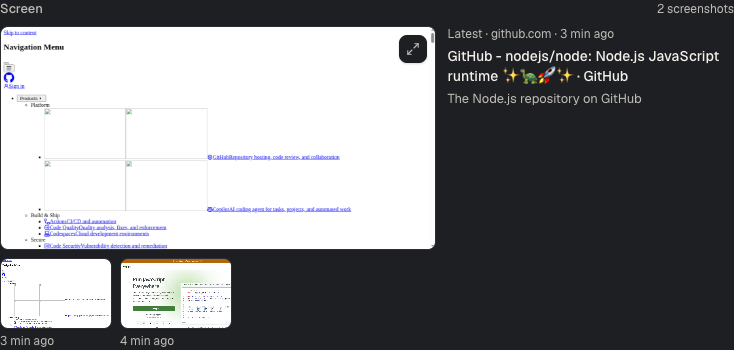
A local screen check of November 15 with a test organization · Open full size CrewshalSites outside the list are refused
Opening example.org is refused before anything reaches the computer, because example.org is not one of its hosts. A link on the page to discord.gg is clicked, and the computer's network proxy refuses it.
The record for step 10
OutputThe refusal of example.org
example.org is not on the hosts that this computer may reach.
CheckRecorded gates
- An unlisted open is refused before the guestPassed
- A link to an unlisted host is refused by the proxyPassed
CrewshalRestored, then revoked: the next call is refused
The check then restores the guest from its checkpoint, and the browser comes back on a new container. After a revoke, the worker's next call is refused: the worker has no computer.
The record for step 11
OutputThe answer to its next call
This worker has no computer.
CheckRecorded gates
- The browser is back after the restorePassed
- Refused after revokePassed
- The guest is retiredPassed
CrewshalOff in production
Production keeps worker computers switched off, and customers see none of this yet. A check on production at 06:15:24 UTC, with an operator test account, found no computers, and a sign-in, a site request and the screenshot list refused; the worker's Setup tab shows no Computer group. All 9 checks passed.
The record for step 12
CheckProduction checks
- List answers enabled false and no computersPassed
- A sign-in is refusedPassed
- A site request is refusedPassed
- The refused-sites list is refusedPassed
- The screenshot list is refusedPassed
- The screenshot route is refusedPassed
- The org has a worker to look atPassed
- The page read the listPassed
- No Computer group on the Setup tabPassed
OutputIn production
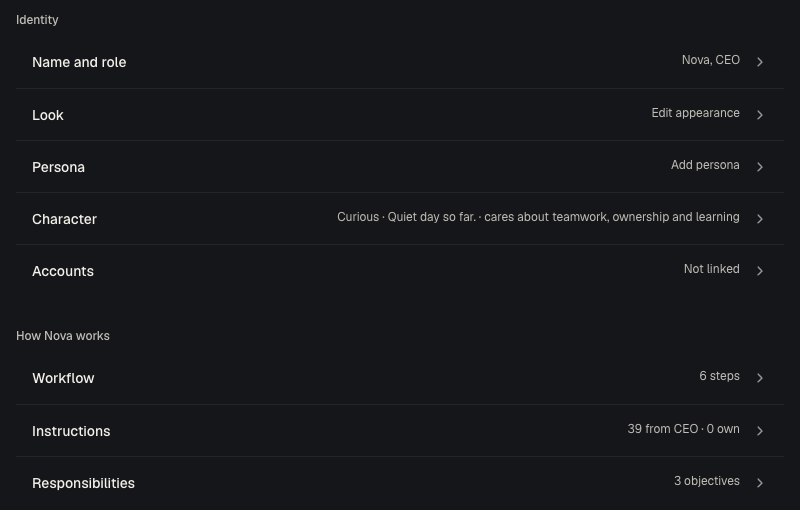
The top of the Setup tab in production, November 15; the check read the whole tab and found no Computer group · Open full size
Result
A real guest went from an approved request to a checkpoint, a restore and a clean revoke; a second guest's browser reached only allowed sites; production keeps the feature off.
- Recorded gates passed
- 19 of 19, then 19 of 19
- After the restore
- Marker gone, 7 tool versions the same, doctor 23 of 23
- In production
- Off; 9 of 9 checks confirm it
Where it ran. Two runs on November 14, 2026 and November 15, 2026 on a Mac (arm64, Docker 29.8.2): a local backend in product mode issued a real guest computer, a Docker container from the platform's guest image, through the product path. The checks called the platform and the worker's tools directly; no AI model ran. Production keeps worker computers off, and a production check on November 15, 2026 confirmed it.
The recorded files behind this replay
- Real guest on a local backend: issue to revoke, 19 gates (November 14) sha256 c315d72bac0e
- Real guest with a browser: allowed site, screenshot, refused sites, 19 gates (November 15) sha256 6b986f7eb85f
- Release record: worker computers released switched off in production sha256 59a57e98f9be
- Release note: the worker browser, its screen and site approvals sha256 ff550d5aef05
- Production check: worker computers are off, 9 checks (November 15) sha256 3588fd4a8a00
- Production capture: the worker Setup tab with no Computer group sha256 f31f44d9097b
- Local screen check: the admin sees the worker screenshots (November 15) sha256 3fc4b65b0ed0
- Local screen check capture: the admin Screen view sha256 1f1c5523b8cd
Why it matters
An AI worker that builds and checks real software needs a real machine: its tools, a browser, and a place to keep its work between tasks. A throwaway sandbox loses that state at the end of each task, and a machine without limits can reach anything on the internet.
The worker's own computer keeps its state inside fixed limits. The platform installs only the tools in its approved manifest. The computer reaches only the hosts on its approved list. A second person approves both, and one revoke takes the computer away. Inside those limits, the worker runs its own commands.
How it works
- An admin issues it. The request names one worker and a built-in install manifest of pinned tools. The manifest names the hosts that the computer may reach, and the admin can add sites.
- A second person approves it. The request goes to the owners. An owner, or an admin who did not issue the computer, can approve it. The admin who issued it cannot. One approval covers the computer's manifest and its hosts.
- One job sets it up. A background job provisions the guest, applies the allowed hosts, installs the tools and runs a health check (the doctor). It then takes a checkpoint and tests a restore. After a crash, the job goes on from its saved record. It does not start a step again while that step still runs in the guest.
- Only approved hosts. A network proxy lets the computer reach its listed hosts and their subdomains, and refuses the rest. A new host needs an admin's request and the approval of a second person, an owner or another admin. The proxy is changed and read back before the tools work again.
- Its own browser. The worker opens, reads, clicks and screenshots pages through governed tools. What a page says counts as outside content. A later step that runs a command, cannot be undone or acts outside the computer waits for a person when it repeats a command or a long passage from the page, or a link from the page to a host that the organization does not already work with, or when the page holds text that looks like an instruction. The platform checks each screenshot by its SHA-256 and keeps it for the organization's admins, up to 200 per computer for 30 days. The worker can also save a copy on its own computer.
- A revoke takes it away. The platform retires the guest and deletes its checkpoints, and the worker's next tool call is refused. A revoke does not remove access that a vendor, such as GitHub, gave the worker. An admin removes that access at the vendor.
What the run showed
The replay above draws on three recorded runs and one image from a separate local screen check. The first two runs were on November 14 and 15, 2026, on a Mac: a local backend in product mode issued a real guest computer, a Docker container from the platform's guest image, through the product path. The checks called the platform and the worker's tools directly; no AI model ran.
- On November 14, an admin issued a computer with 9 allowed hosts, and the owner approved the high-risk request. One job provisioned the guest, applied the hosts, installed the tools (1 min 31 s) and ran the health check: 23 of 23 checks. All of onboarding took 2 min 25 s, on its first attempt.
- The job took a checkpoint, wrote a marker file into the computer and restored the checkpoint. The marker was gone, the 7 tool versions were the same, and the health check passed 23 of 23 again. The check then looked in the guest itself and found no marker.
- Hosts outside the list were refused. A second start did nothing, and a job replayed as if after a crash did no new work in the guest. After a revoke, the guest and its checkpoints were gone, and nothing of the run was left. All 19 gates passed.
- On November 15, a second computer, with a browser, opened nodejs.org, read the page, scrolled and took a screenshot of 1279 by 656 pixels, which the platform served to admins only. Opening example.org was refused before it reached the computer, and a link to discord.gg was refused by the proxy. After a revoke, the next call was refused. All 19 gates passed.
- The same day, a check on production with an operator test account found worker computers switched off: no computers, and a sign-in, a site request and the screenshot list refused. All 9 checks passed.
Limits
- Off in production. Customers cannot use worker computers yet; production keeps the feature switched off.
- A local guest. These runs used a Docker container on a Mac. The host for customers' computers is not decided yet.
- No AI model in these runs. The checks called the tools directly. An owned lab run on November 16 used such a computer with a real model; see Correct once.
- Sign-in is not shown. Signing the worker's own tools in with a device code was tested in a separate run that stopped at the code prompts.
Frequently asked questions
Can the worker reach any website?
No. The computer reaches only the hosts on its approved list and their subdomains. A new host needs an admin's request and the approval of a second person, an owner or another admin, and the platform changes the proxy before the tools work again.
What happens when a computer is revoked?
The platform retires the guest and deletes its checkpoints. The worker's next tool call is refused, because the worker has no computer. A revoke does not remove access that a vendor, such as GitHub, gave the worker; an admin removes that access at the vendor.
Who sees what the worker's browser shows?
The worker reads the pages that it opens. The platform keeps the worker's screenshots for the organization's admins, up to 200 per computer for 30 days, and checks each one by its SHA-256. The worker can also save a copy of a screenshot on its computer, for example to attach to a pull request.
Can I use this today?
Not yet. The feature is built and switched off in production, and a production check on November 15, 2026 confirmed that it is off.